
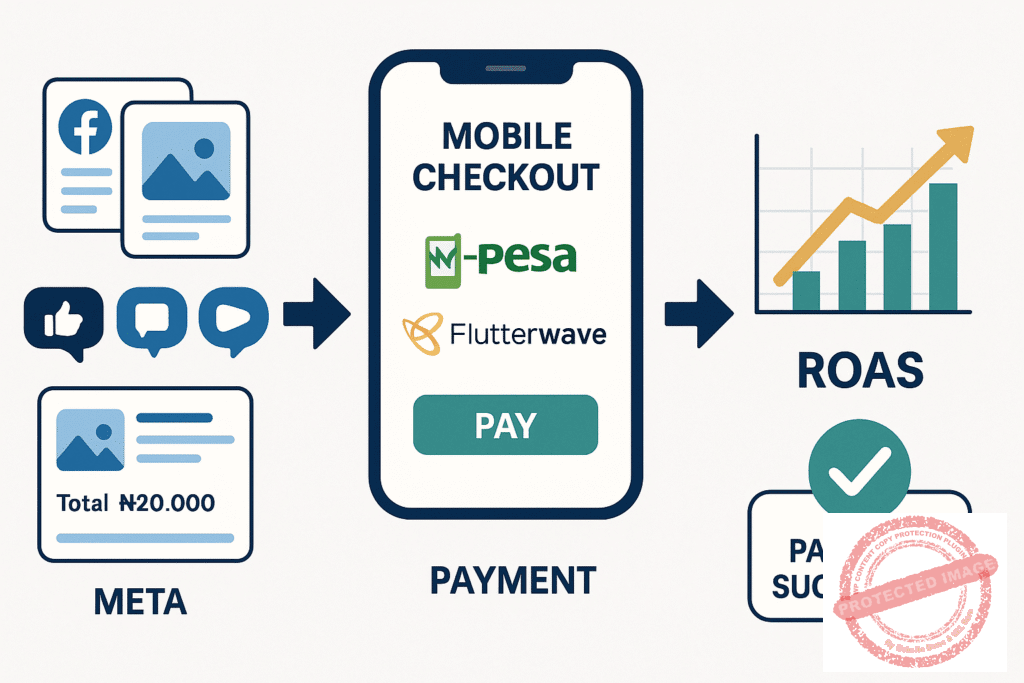
Optimizing Your Meta Ads Funnel for Mobile Money Conversions
A step-by-step guide to funnel tweaks that can double your ROAS by integrating M-Pesa and Flutterwave checkout flows directly into your ad journeys.
The African E-commerce Reality Check
In the fast-growing African e-commerce market, speed and convenience are not just perks; they are requirements. You can have the most compelling Meta Ad campaign, but if your checkout process is slow, complicated, or doesn't support local payment preferences, you are leaving a significant amount of money on the table.
Customer Expectation: Users expect to pay with the methods they trust and use daily, like M-Pesa in East Africa or card/bank transfers via Flutterwave across the continent.
Critical ROAS Impact
Friction at the payment stage is the #1 killer of Return on Ad Spend (ROAS)
The Optimization Framework
This guide provides a step-by-step framework for optimizing your Meta Ads funnel specifically for mobile money conversions. By creating a seamless journey from ad click to payment confirmation, you can reduce cart abandonment, build customer trust, and potentially double your ROAS.
African Fintech Integration Focus
We will focus on integrating two powerhouses of African fintech directly into your advertising strategy
M-Pesa Integration
Dominant mobile money platform across East Africa. Essential for Kenya, Tanzania, and neighboring markets.
Flutterwave Integration
Pan-African payment gateway supporting cards, bank transfers, and mobile money across the continent.
Table of Contents
Organized navigation for technical guide
The Core Problem: Why Your Funnel is Leaking Money
Part 1: Auditing Your Current Ad-to-Checkout Journey
Part 2: Strategic Funnel Tweaks for Mobile Money
Part 3: Technical Integration of Flutterwave & M-Pesa
Integrating Flutterwave for Pan-African Reach
Integrating M-Pesa for East African Dominance
Part 4: Measuring and Optimizing for ROAS
Conclusion: From Funnel to Flywheel
The Core Problem: Why Your Funnel is Leaking Money
Imagine This Scenario
A customer in Nairobi sees your ad on Instagram for a product they love. They click, add it to their cart, and proceed to checkout. They are ready to pay with M-Pesa. However, they are presented with a form asking for credit card details they may not have or trust using online. Frustrated, they close the tab. You just paid for a click that resulted in a lost sale.
Impact Breakdown
This scenario is incredibly common. The disconnect between a customer's payment preference and the options you provide creates massive friction. This friction leads to:
High Cart Abandonment
Users get to the final step but can't pay easily
Low Conversion Rates
Your ad spend generates clicks but not sales
Poor ROAS
You spend more on ads than you make in revenue
Eroded Trust
A complicated checkout process can make your brand seem untrustworthy
Key Insight
Optimizing for mobile money is about removing this friction and aligning your entire sales process with the local market's reality.

Part 1: Auditing Your Current Ad-to-Checkout Journey
Before you can fix the leaks, you need to find them. This audit will give you a clear picture of where your funnel is failing.
Map the User Journey
Open an incognito browser window and go through your own sales funnel as if you were a customer. Start by clicking on one of your live Meta Ads. Document every single step:
Journey Checklist
-
Ad Click: The user sees the ad and taps
-
Landing Page: Where do they land? Product page, collection, or homepage?
-
Add to Cart: How many clicks does it take?
-
Begin Checkout: What information is required on the first checkout page?
-
Shipping Information: How many fields do they need to fill?
-
Payment Page: What are the visible payment options?
-
Confirmation: The final step
Identify Friction Points
Now, analyze the journey you just mapped. Where might a customer get frustrated and leave?
Slow Page Load Speed
Does the landing page take more than 3 seconds to load on a mobile connection?
Confusing Navigation
Is it obvious how to add an item to the cart and check out?
Forced Account Creation
Do you require users to create an account before they can buy? This is a major conversion killer
Excessive Form Fields
Are you asking for unnecessary information like a "Company Name" for a B2C product?
Hidden Payment Options
Are M-Pesa or Flutterwave options buried under a generic "Credit Card" gateway?
Unexpected Costs
Are high shipping fees only revealed at the very last step?
Benchmark Your Conversion Rate
Look at your data. In your Meta Ads Manager and e-commerce platform (e.g., Shopify), find your baseline metrics:
Ad Click-Through Rate (CTR)
Are people clicking your ads?
Landing Page Conversion Rate
What percentage of visitors add a product to their cart?
Checkout Initiation Rate
What percentage of people who add to cart start the checkout process?
Purchase Conversion Rate
What percentage of people who start checkout actually complete the purchase?
Part 2: Strategic Funnel Tweaks for Mobile Money
With your audit complete, you can now make targeted changes to smooth the path to conversion.
Pre-Qualify with Payment Method Callouts in Your Ad
Strategy
Mentioning trusted payment options directly in your ad creative and copy can significantly increase conversion intent. It tells the customer, "We make it easy for you to buy."
Ad Copy Examples
Example 1
"Shop now and pay easily with M-Pesa or Card! 🇰🇪"
Example 2
"Secure checkout with Flutterwave. All major banks supported. 🇳🇬"
Ad Creative Tip
Include the M-Pesa or Flutterwave logo as a small, non-intrusive element in your ad image or video. This visual cue builds instant trust.
Headline Example
[Product Name] | Pay with M-Pesa
Expected Result
This simple tweak filters for high-intent buyers who are comfortable with these payment methods and reassures them before they even click.
Align Your Landing Page with Payment Expectations
Strategy
The promise you make in the ad must be immediately fulfilled on the landing page.
Implementation Tips
Trust Badges
Place the Flutterwave and M-Pesa logos prominently "above the fold" on your product or landing page, near the "Add to Cart" button
Reinforce in Microcopy
Use small text near the price or CTA button, such as "Secure payments via M-Pesa & Flutterwave"
Dedicated Payment Info
Consider adding a small, expandable section on the product page that details the seamless checkout process
Simplify the Checkout Flow with Express Options
Strategy
The goal is to get the customer to the payment step as quickly as possible.
Critical Changes
Enable Guest Checkout
Do not force users to create an account. This is the single most effective way to reduce checkout abandonment
Use Express Checkout Buttons
If your platform (like Shopify) supports it, enable one-click payment buttons like Shop Pay, which can be integrated with payment gateways
Prioritize Mobile Money
Don't hide M-Pesa or Flutterwave at the bottom of a long list. Make them the default or most prominent options for relevant regions
Pro Tip
If the shipping address is in Kenya, automatically display the M-Pesa STK Push option first.

Part 3: Technical Integration of Flutterwave & M-Pesa
Here's how to ensure these payment gateways are set up correctly on your e-commerce platform (using Shopify as the primary example).
Integrating Flutterwave for Pan-African Reach
Why Flutterwave
Flutterwave is excellent because it consolidates multiple payment methods (card, bank transfer, USSD, mobile money) into one gateway, making it the ideal solution for businesses targeting multiple African markets.
Setup Steps
Sign Up for Flutterwave
Create a merchant account on the Flutterwave website and complete their verification process to get access to your dashboard.
Install the Flutterwave App
In the Shopify App Store, search for "Flutterwave Payments" and install it to your Shopify store.
Connect Your Account
Follow the app's instructions to connect your Flutterwave merchant account by entering your API keys (found in your Flutterwave dashboard).
Activate the Gateway
In your Shopify settings (Settings > Payments), activate Flutterwave as a payment provider to make it available at checkout.
Customize (Optional)
In the Flutterwave app settings, you can customize the title of the payment method that appears at checkout (e.g., "Pay with Card, Bank, or USSD via Flutterwave").
Integrating M-Pesa for East African Dominance
Why M-Pesa
For merchants targeting Kenya, a direct M-Pesa integration like an STK Push is the gold standard, offering the most seamless payment experience for mobile money users.
Setup Steps
Use a Third-Party App
The most reliable way to integrate M-Pesa with Shopify is through a dedicated app. Search the Shopify App Store for options like "PesaPal," "Africa's Talking," or other gateways that offer a direct M-Pesa API.
Get M-Pesa Paybill/Till Number
You will need a business Paybill or Till Number from Safaricom. The integration app will require these credentials to connect to the M-Pesa API.
Install and Configure
Install your chosen app and enter your M-Pesa business details and API keys as prompted in the app's setup wizard.
Activate and Test
Activate the gateway in your Shopify payment settings. Crucially, run a live test transaction to ensure the STK Push is sent to your phone and the order is marked as "paid" in Shopify upon completion.
Critical Feature
The STK Push, which prompts users to enter their PIN on their phone, is the most seamless mobile money experience. It eliminates the need for customers to manually enter payment details and significantly reduces checkout friction.
Part 4: Measuring and Optimizing for ROAS
After implementing these changes, you must track their impact to prove the ROI.
Setting Up Conversion Tracking
Ensure your tracking is flawless to capture every conversion and accurately measure your return on ad spend.
Meta Pixel
Confirm your Meta Pixel is installed correctly on your website and is tracking standard events like ViewContent, AddToCart, InitiateCheckout, and Purchase.
Conversions API (CAPI)
Set up CAPI alongside the Pixel. This server-side tracking helps capture conversions that might be missed by browser-based tracking due to ad blockers or iOS 14+ privacy changes. Shopify has a native integration that makes this easy.
Value-Based Tracking
Make sure your Purchase event is sending the transaction value back to Meta. This is essential for calculating ROAS and optimizing your campaigns for maximum revenue.
Analyzing Key Metrics
After your new funnel has been running for at least two weeks, compare your new metrics to your old benchmarks. Pay close attention to these critical indicators:
Performance Metrics Dashboard
Purchase Conversion Rate
Has the percentage of people completing checkout increased?
Cost Per Purchase
Has your cost to acquire a customer gone down?
Return on Ad Spend (ROAS)
For every dollar spent on ads, how much revenue are you generating?
ROAS Formula
This is the ultimate metric for evaluating advertising effectiveness. A ROAS of 4.0 means you're generating $4 in revenue for every $1 spent on ads.
Action Step
If you see a positive lift in these metrics, you can start scaling your ad spend. Continue to A/B test different ad copy, creatives, and landing page elements to further refine your funnel and maximize your return on investment.
Conclusion: From Funnel to Flywheel
Optimizing your Meta Ads funnel for mobile money is not just a technical task; it's a customer-centric strategy. By understanding and respecting the payment habits of your target audience in markets like Kenya and Nigeria, you remove the biggest obstacle between interest and purchase.
It builds brand loyalty, encourages repeat purchases, and generates positive word-of-mouth. Your smooth, trustworthy funnel becomes a self-reinforcing flywheel, turning ad spend into sustainable business growth and creating happy customers who feel understood.
Need help optimizing your Meta Ads funnel for African markets? Our team specializes in mobile money integration and ROAS optimization.
Book Your Funnel Audit Call